

1
Sign Up for an Account
Go to https://a2agent.me/register and create a free account. A2Agent credits your new account with free trial credits automatically — no payment method needed to get started. You can use those credits to explore models and test latency before adding funds.
2
Create an API Key
- Sign in at https://a2agent.me/login.
- Open the “API Keys” page from the console navigation.
- Click “Create Key.”
- Enter a name, select one or more groups, and then confirm. Selecting all groups is recommended.
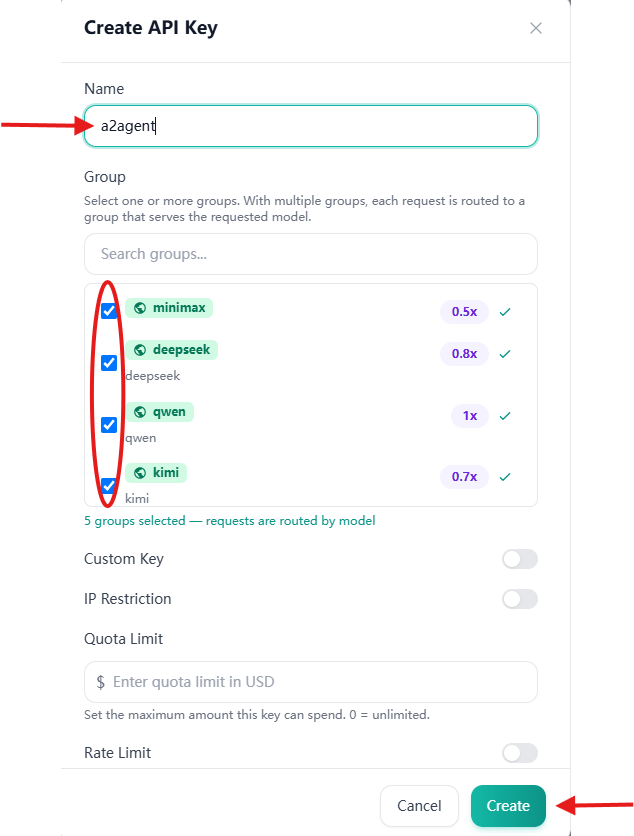
- After the key is created, copy its value.
3
Make Your First Request
After obtaining your API key, run one of the following commands in your terminal. Replace 
YOUR_API_KEY with the key you copied earlier.OpenAI-Compatible API
choices array containing the model’s reply. You can swap "deepseek-v4-pro" for any model listed on the Models Page without changing anything else.OpenAI SDK
If you prefer to use the Python or Node.js OpenAI SDK, only the API key and base URL need to be configured.Python
Node.js
Anthropic-Compatible API
A2Agent also supports the Anthropic API format. Send requests to the Anthropic messages endpoint:deepseek-v4-pro with any compatible model listed on the Models Page .A2Agent uses Bearer Token authentication for Anthropic-compatible requests. When using an Anthropic SDK, configure it to send theAuthorization: Bearer YOUR_API_KEYheader. Depending on the SDK version, this may require theauth_tokenorauthTokenoption instead of the defaultapi_keyorapiKeyoption.
4
Check Your Usage
Log in at https://a2agent.me/login and navigate to the Usage section of the console to see a breakdown of requests, token counts, and spend by model. Your remaining balance is displayed at the top of the page.
A2Agent is fully compatible with the OpenAI Chat Completions protocol. Any SDK or tool that lets you configure a custom base URL — including the official
openai Python and Node.js libraries — works with A2Agent out of the box. Set base_url (or OPENAI_BASE_URL) to https://api.a2agent.me/v1 and point api_key at your A2Agent key.Next Steps
AI Coding Clients
Configure Claude Code, Cursor, Codex, and other AI coding tools to use A2Agent as their backend.
All Models
Browse the full model list — GLM, Kimi, DeepSeek, Qwen, and MiniMax — with pricing and context-window details.