> ## Documentation Index
> Fetch the complete documentation index at: https://docs.a2agent.me/llms.txt
> Use this file to discover all available pages before exploring further.
# Use A2Agent Models with Chatbox
> This guide explains how to add A2Agent as a model provider in Chatbox and start using DeepSeek, Kimi, GLM, MiniMax, and more.
A2Agent is a unified API gateway that provides access to multiple models through a single API endpoint and API key. Model availability, usage limits, and billing are managed through your A2Agent account.
## Prerequisites
* Chatbox Desktop installed
* An A2Agent API key — [sign up at a2agent.me/register](https://a2agent.me/register) to get one
* API request URL: `https://api.a2agent.me/v1`
## Setup
### 1. Add a Provider
Open Chatbox. On the home page, go to **Settings** → **Model Provider**, then click **Add**.
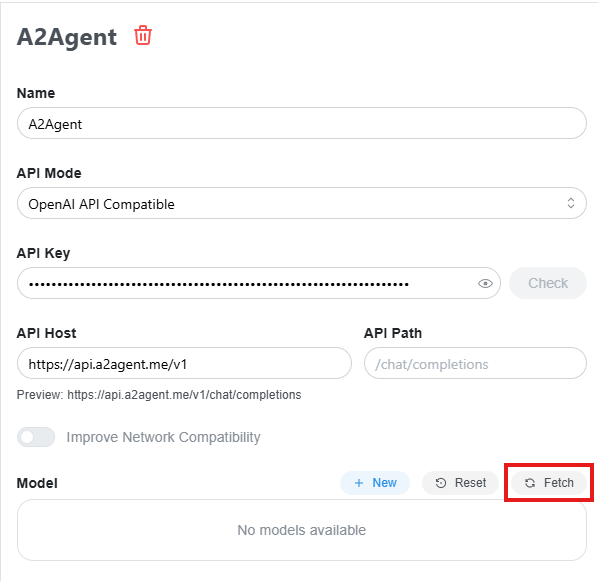
### 2. Fill in the Provider Information
* **Provider Name**: Custom, e.g. `A2Agent`
* **API Mode**: `OpenAI API Compatible`
* **API Key**: Your A2Agent API key
* **API Request URL**: `https://api.a2agent.me/v1`
 ### 3. Fetch and Select Models
In the model configuration section, click **Fetch** to get the model list. After Chatbox fetches the models from A2Agent, select the models you want to use and save the provider configuration.
### 3. Fetch and Select Models
In the model configuration section, click **Fetch** to get the model list. After Chatbox fetches the models from A2Agent, select the models you want to use and save the provider configuration.
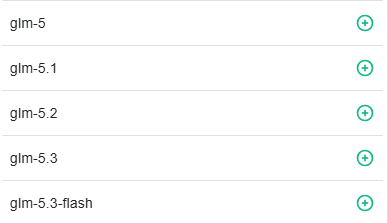 The model list will be updated dynamically as models evolve.
## Start Using A2Agent Models
After the configuration is saved, go back to the chat page in Chatbox, switch to the A2Agent provider in the model picker, and choose an enabled model to start chatting.
## Troubleshooting
* **The model list fails to load**: Verify that your API key is valid, your account has available balance, and your network can reach `https://api.a2agent.me/v1`.
* **The model list is empty**: Make sure the provider information and model configuration were saved, then fetch the model list again.
* **Models are still unavailable**: Restart Chatbox and try again.
The model list will be updated dynamically as models evolve.
## Start Using A2Agent Models
After the configuration is saved, go back to the chat page in Chatbox, switch to the A2Agent provider in the model picker, and choose an enabled model to start chatting.
## Troubleshooting
* **The model list fails to load**: Verify that your API key is valid, your account has available balance, and your network can reach `https://api.a2agent.me/v1`.
* **The model list is empty**: Make sure the provider information and model configuration were saved, then fetch the model list again.
* **Models are still unavailable**: Restart Chatbox and try again.